
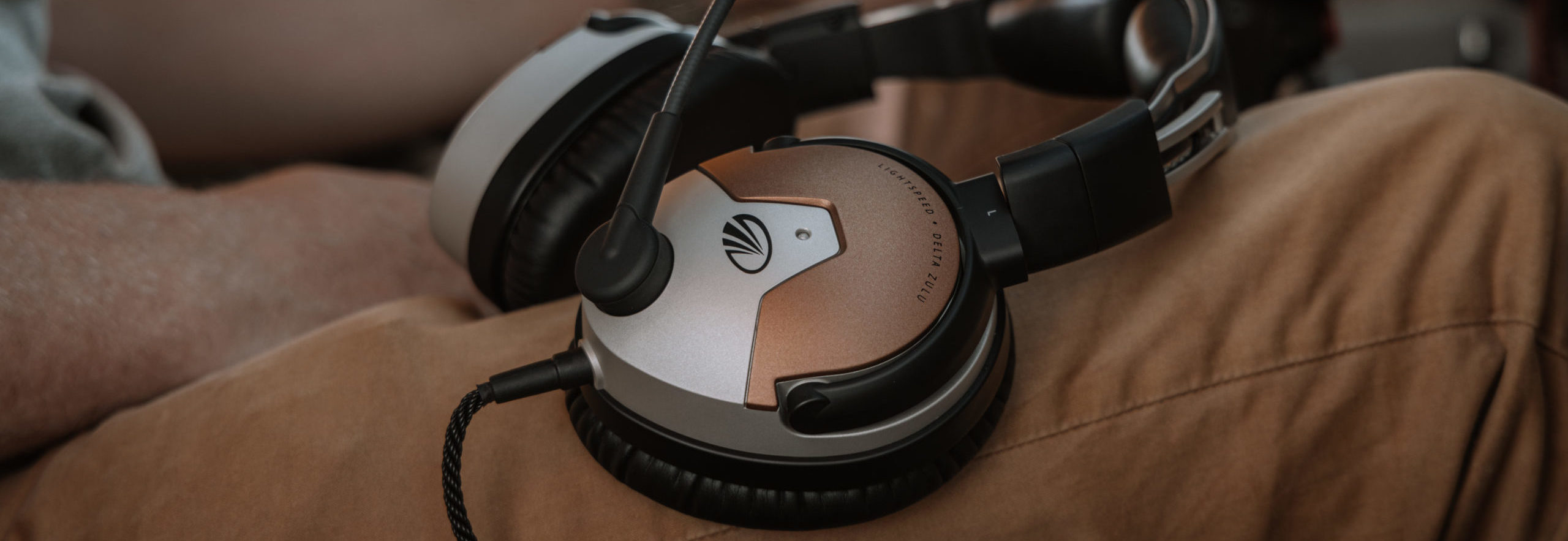
Lightspeed Delta Zulu® Support and FAQ
Here you can learn more about Lightspeed Delta Zulu, read frequently asked questions, watch videos, and download the most current Lightspeed Delta Zulu user guide [PDF]
Lightspeed Delta Zulu FAQ
- Why do I hear radio communications in only one ear, or weakly in both?
- How can I reduce static noise during cell phone calls?
- When pairing Lightspeed Delta Zulu with my phone via Bluetooth wireless technology, why does my phone indicate it cannot connect?
- Why is the Smart Button action “Force Bluetooth Pairing” not working?
- During take off or occasionally in cruise, I sometimes hear a ‘popping’ or low rumbling sound. What causes that…and how can I fix it?
- The ear cups are resting on the tops of my ears, which is uncomfortable. How can I adjust my ear cups for the best possible fit?
- Where can I find my product serial number?
- When I make a cell phone call, I can’t hear the person I‘m calling. What’s the problem?
- My Lightspeed Delta Zulu seems to have a higher voice threshold to trigger communication. I have to speak more loudly, or position the mic closer to my mouth, to break squelch. Compared to my Zulu 2 or Zulu 3, is that true? What can I do to improve this?
- Exactly what does Mic Gain Adjustment do?
- How do I activate ComPriority?
- How do I ensure that I am matching the Stereo/Mono Setting to my Audio Panel?
- How do I change a DIP Switch Setting?
- Does it really matter if I register my headset?
- What is the warranty for a new headset?
- How long do the ear seals, head pads, and mic muffs last?
- In addition to Bluetooth, how do I connect my music player to the Lightspeed Delta Zulu headset?
- What kind of batteries are recommended in the battery pack?
- What is the lifespan of the CO sensor?
- How will I know if the CO sensor is faulty? Will the headset notify me?
- Will I be able to upgrade my Zulu 3 to a Lightspeed Delta Zulu?
- Do I need to hardwire a connection between my headset and the iPhone to record audio on the headset?
- Do we sell adapters going LEMO to GA for the Lightspeed Delta Zulu headset?
- How do I connect multiple devices to my headset via Bluetooth?
- I have some hearing loss and wear hearing aids. Can I wear my hearing aid with the Lightspeed Delta Zulu and how will the HearingEQity feature work?
- How do I know the carbon monoxide detection system is working in the aircraft without the app?
- Can I use the Lightspeed Delta Zulu if I have an Android device?
- Can I recharge my headset through my panel?
- How do I know how much remaining battery life I have on my Lithium Ion and AA batteries?
- When flying, what causes a thumping or warbling noise in the ear cup?
Why do I hear radio communications in only one ear, or weakly in both?
The Lightspeed Delta Zulu Stereo/Mono DIP switch is likely set to Stereo while your audio panel is transmitting a mono signal. To fix this, change the Lightspeed Delta Zulu Stereo/Mono DIP switch to Mono (the “on” position). This setting does not affect music or audio from auxiliary devices; you can hear stereo sound on auxiliary devices even when the Stereo/Mono DIP switch is set to Mono.
How can I reduce static noise during cell phone calls?
To reduce RF interference during phone calls, keep cell phones at least 12 inches from the Lightspeed Delta Zulu controller and headset when making calls.
When pairing the Lightspeed Delta Zulu with my phone via Bluetooth wireless technology, why does my phone indicate it cannot connect?
The headset may not be in pairing mode. To enter pairing mode, you must start with Bluetooth mode turned fully OFF. It’s a good practice to turn off Bluetooth before turning off your headset which may help retain the pairing
Why is the Smart Button action “Force Bluetooth Pairing” not working?
A smart device may already be connected to your headset. If the device is playing music, on a phone call or using FlightLink, the headset prevents unpairing for safety concerns. Please pause music, end the call, or stop the FlightLink recording to return the device to “idle”. Once this has been achieved, please attempt Bluetooth Pairing again.
During take off or occasionally in cruise, I sometimes hear a ‘popping’ or low rumbling sound. What causes that…and how can I fix it?
Some intermittent popping is typically a byproduct of noise or vibration that creates an instability in the ANR electronic performance. Noise levels, or cup movement, causes the ANR system to be chasing ‘noise’ that is intermittent and hard to cancel. The instability can cause something that sounds like popping.
Headset fit is the best, most important tool to eliminate these occasional noise artifacts. The two main reasons for this behavior would be the position of the cups on your head and the seal around your ears.
1. Follow the fit instructions on page 6 to ensure it is comfortably positioned and high enough to not rest to much on your jaw. If you are consistently having this ‘popping’ problem, call and request a taller head pad.
2. Try to ensure the earlobe is fully ‘inside’ the cup and then minimize the leaks that might occur around sunglass frames. Many are very flat but non-aviator versions might have significant thickness in the frames. To test for whether the seal is good, press in slightly on the cup (during any popping) and see if it goes away.
If additional help is still needed, please reach out to our Customer Service line and we can provide more
customized solutions.
The ear cups are resting on the tops of my ears, which is uncomfortable. How can I adjust my earcups for the best possible fit?
To center your ears within the ear cups, a taller headpad should solve this problem. This will move the ear cups further up the side of your head so you can center your ears within the cups.
Order a complimentary tall head pad (Part No. A484) by calling Customer Service at 800-332- 2421, or email them at [email protected]. You will need to provide your headset serial number.
Where can I find my product serial number?
The Lightspeed Delta Zulu serial number (a small, white, barcode sticker with numbers) is located on the headset underneath the head pad on the inner radius of the headband. Remove the head pad to reveal the serial number. Simply pinch the cushioned part of the head pad, pull down and it will snap out.
When I make a cell phone call, I can’t hear the person I‘m calling. What’s the problem?
Always disable ComPriority before making cell phone calls because the other party will be muted. When activating the ComPriority button, an audible message will report the function is “enabled” or “disabled”.
My Lightspeed Delta Zulu seems to have a higher voice threshold to trigger communication. I have to speak more loudly, or position the mic closer to my mouth, to break squelch. Compared to my Zulu 2 or Zulu 3, is that true? What can I do to improve this?
The Mic and pre-amp on the Lightspeed Delta Zulu mic was modified to create less background noise when you break squelch and speak. It creates a quieter flying experience for all attached to your ICS system. Used individually, you will naturally compensate for that with an adjustment to your squelch setting. While
that is a positive for overall system noise reduction, some people will experience the difficulty you
described.
To ensure you gain the benefits of this additional quieting performance, please do the following IF
your other headsets are from Lightspeed Aviation:
1. On the NON-Lightspeed Delta Zulu models, remove the mic muff and then remove (carefully, they are easy to
lose!) the small black cap on the back side of the microphone holder.
2. With a small, jeweler’s flathead screw driver, insert it into the ‘slot’ and turn the internal gain potentiometer inside counter clockwise 1 ‘Hour’ (for example, from the 11:00 position to 10:00).
3. Re-attach the black cap and try it out in your plane. It should have largely equalized the squelch setting that will work well for all your headsets.
If you have only a single squelch intercom control and do NOT have Lightspeed headset, the other brands don’t provide this customizing feature. Sadly, you will have to do the ‘reverse’ of the above, and forfeit some of the quieting available in a Lightspeed Ecosystem.
1. On the Lightspeed Delta Zulu models, remove the mic muff and then remove (carefully, they are easy to lose!) the small black cap on the back side of the microphone holder.
2. INCREASE the gain on your Lightspeed Delta Zulu headset… start with one ‘hour’ (so 11:00 to 12:00).
3. Re-attach the black cap and try it out in your plane and with your ICS. It should have largely equalized the squelch setting that will work well for all your headsets. You will likely experience a higher level of background noise when your mic is ‘open’.
Exactly what does Mic Gain Adjustment do?
Mic gain adjusts the sensitivity of the microphone to help balance loud and soft voices you hear in a multi-headset environment.
How do I activate ComPriority?
ComPriority is automatically enabled by default when you power on your headset.
Turn on or off ComPriority using the bottom controller button. When ComPriority is enabled and radio communications are detected, the volume of auxiliary devices will be significantly reduced to make incoming communication the priority.
How do I ensure that I am matching the Stereo/Mono Setting to my Audio Panel?
The Stereo/Mono DIP switch setting should match the signal from your audio panel. The Lightspeed Delta Zulu is shipped in Mono (the “on” position). Unless you are using your intercom or Audio panel to provide Stereo music to listeners, there is no reason to switch your dip switch settings to stereo. Bluetooth music will be played in Stereo even with a “Mono” setting.
STEREO should be used for a stereo panel and MONO for a mono panel.
Generally no changes are needed to deliver optimal performance in most aircraft. Certain audio panels require the portable units to be set to the Stereo position.
How do I change a DIP Switch Setting?
DIP switches are factory set to match most aircraft audio panels. To change a DIP Switch setting:
1. Slide off the battery cartridge to reveal the DIP switch.
2. Use a small pointed object (such as a wood toothpick) to slide the DIP switch to ON or OFF.
Does it really matter if I register my headset?
Absolutely! Registering your headset will assure quick and efficient processing of any repair or accessory purchases that you may need. If you purchased your Lightspeed Delta Zulu headset directly from Lightspeed, your headset is already registered with us.
You will need your serial number to register your headset or make a request for warranty repair.
What is the warranty for a new headset?
Lightspeed Aviation, Inc. has a 7-year limited warranty for new Zulu series headsets.
How long do the ear seals, head pads, and mic muffs last?
To ensure peak ANR performance and comfort, replace the ear seals, head pads, and mic muffs every 18 months. These are wear items that are not covered by the Lightspeed warranty and are available for purchase on our website at LightspeedAviation.com/Accessories.
In addition to Bluetooth, how do I connect my music player to the Lightspeed Delta Zulu headset?
To connect a music player to the Lightspeed Delta Zulu auxiliary input jack, use an appropriate UAC cord. To adjust the volume on a device connected using the auxiliary input jack, use the controls on the connected device.
What kinds of batteries are recommended in the battery pack?
Easy to replace battery packs give you the option of using AA batteries or the included rechargeable lithium ion battery pack, your choice.
What is the lifespan of the CO sensor?
The lifespan of the carbon monoxide sensor is 10 years. You can send your headset in to have a CO sensor replaced for a nominal fee.
How will I know if the CO sensor is faulty? Will the headset notify me?
The headset checks that the CO sensor is operational on each power up and during operation. The headset will notify the user of a problem via an audible warning “Carbon Monoxide Not Monitored” and there will be a visual error shown in the mobile app.
Will I be able to upgrade my Zulu 3 to a Lightspeed Delta Zulu?
Yes, you will be able to trade in your Zulu 3 to a Lightspeed Delta Zulu near the Summer of 2023 through our Trade Up Program. We will not be able to convert your Zulu 3 to a Lightspeed Delta Zulu, like we do for Zulu 2 to Zulu 3.
Do I need to hardwire a connection between my headset and the iPhone to record audio on the headset?
No, you do not. Our UAC to Lightning cable will work for this, but you can also accomplish this via Bluetooth.
Do we sell adapters going LEMO to GA for the Lightspeed Delta Zulu headset?
Yes, you can find that accessory here.
How do I connect multiple devices to my headset via Bluetooth?
Whatever device is selected as the primary audio device, the iOS device audio will stream to and take calls from. There are 5 scenarios we have provide here and the expected behavior of each when an iOS Device is connected to:
- The Lightspeed Delta Zulu AND a Bluetooth speaker: If the Lightspeed App is installed, will transfer app data or perform flight record regardless of what audio device is selected. All Lightspeed app functions should operate without interference from headset #2.
- Please note: If the non-active device initiates an “Audio Center” button action (Play/Pause/Answer Call), it will take over as the primary audio device. If the user presses the center button on either device during the HearingEQity test, it will stop the test tone. If pressed on a non-active device, it will swap.
- 2(two) Lightspeed Delta Zulu Headsets: If the Lightspeed App is installed, will transfer app data or perform flight record regardless of what audio device is selected. All Lightspeed app functions should operate without interference from headset #2.
- Please note: If the non-active device initiates an “Audio Center” button action (Play/Pause/Answer Call), it will take over as the primary audio device. If the user presses the center button on either device during the HearingEQity test, it will stop the test tone. If pressed on a non-active device, it will swap.
- Lightspeed Delta Zulu AND Share Audio enabled headphones (AirPods or Beats): Despite the ability of “Share Audio” enabled devices being connected, only one active audio stream can be connected. This is due to Lightspeed Delta Zulu not supporting this feature. Due to this, it should follow scenario #1 above.
- The Lightspeed Delta Zulu AND Peripheral BT device (such as GPS): If the Lightspeed App is installed, it will transfer app data or perform flight record regardless of what audio device is selected. Peripheral device companion app should not affect data communication between the Lightspeed App and the Lightspeed Delta Zulu and vice versa
- Please Note: Peripheral apps have varying behavior based on how they manage their own audible alerts and notifications. The Lightspeed App will not interfere with normal capabilities of other peripheral apps. However, experience may vary when using the Flight Recorder feature in the Lightspeed App.
- The Lightspeed Delta Zulu AND aircraft panel with Bluetooth: This is a combination of a #1 and #4 above. A Bluetooth enabled Nav/Radio can function as a GPS (Peripheral Device) AND a BT Speaker/Generic Headset.
Normal operation of the Lightspeed Delta Zulu headset should not be affected for any of these scenarios, and alerts should play normally.
I have some hearing loss and wear hearing aids. Can I wear my hearing aid with the Lightspeed Delta Zulu and how will the HearingEQity feature work?
Yes, you can wear your hearing aid with the Lightspeed Delta Zulu ANR headset. If you want to use the HearingEQity feature to enhance your hearing acuity, take the 12-frequency test in the Lightspeed App to create a customized profile. If you plan on using your hearing aid during flight, while also using your new HearingEQity profile, be sure to take the test while wearing your hearing aid. You can create a different profile without the hearing aid if you chose to do so.
How do I know the carbon monoxide detection system is working in the aircraft without the app?
The CO sensor and remainder of circuitry gets checked for functionality every time that the headset powers on. If there is an error, there will be an audio alert “CO Not Monitored”. If it is working normally, you will not get this message. However, you can tell the CO value by a single press on the multifunction button. If you press this within 3 minutes of powering on the headset you will receive the message “Calculating Carbon Monoxide”. After the initial calculation period, the single press action will report the CO value to you. For example, with no CO present, it will say “Carbon Monoxide Normal, zero PPM”.
Can I use the Lightspeed Delta Zulu if I have an Android device?
The Lightspeed App is NOT REQUIRED to use the Lightspeed Delta Zulu ANR headset. For primary Android device users, an iOS device is only needed to set up your HearingEQity™ profile along with carbon monoxide preferences and PPM settings for the first time accessing the Lightspeed App. You may use any iPhone or an iPad or other similar Apple device with iOS version 13 or higher. Your personalized hearing profile and CO alert preferences will be saved in your headset after you complete the set-up process, eliminating the need to have an iOS device for future use with your Lightspeed Delta Zulu.
Please note that while some additional convenient functions on the App will not be available without regular access to an iOS device, the important safety features of Lightspeed Delta Zulu are stored in the headset itself. Once set up, they will automatically deliver improved flying safety.
Can I recharge my headset through my panel?
Yes, if you have a Panel Power/LEMO (6-pin) plug on your Lightspeed Delta Zulu, the power from your aircraft panel will charge your Lithium-Ion battery during operation. You can also use a USB-A to UAC accessory cable from the panel if it has USB ports. In this scenario your panel will charge the Lithium-Ion battery in all three plug configuration versions of the Lightspeed Delta Zulu – Dual GA, Heli and Panel Power/LEMO(6-pin).
How do I know how much remaining battery life I have on my Lithium Ion and AA batteries?
Using the Lightspeed App, you can see how much battery life you have remaining by going to the Settings Tab. You will see a percentage (%) remaining field in the upper left corner of the Lightspeed App.
When flying, what causes a thumping or warbling noise in the ear cup?
To gain peak performance from the ANR feature designed into your Lightspeed headset, it is necessary to have a solid seal around your ears. Without a tight seal, air can seep in and cause the ANR to compensate for uneven internal cup pressure, often resulting in a warbling noise. If you are experiencing this issue, please contact customer service so that we may assist you in identifying and correcting the problem. Customer service may be reached at: 1-800-332-2421 or [email protected].